Apple's App Store pricing system in 2026 offers developers 900 price points across 175 storefronts and supports 44 currencies. While Apple simplifies regional pricing by automatically converting a base price to local currencies, this approach often fails to account for local purchasing power, causing prices in markets like India or Brazil to be 2–3 times higher than affordable levels.
Key updates for 2026 include:
- January 2026 adjustments: Tax and pricing changes in nine countries, including VAT increases in Kazakhstan and Russia, and a digital tax reduction in Turkey.
- New pricing structure: $0.10 increments for prices under $10, $0.50 for $10–$50, and $1.00 for prices above $50.
- Commission changes: Apple's standard rate remains 30%, but China now benefits from a reduced 25% rate for in-app purchases.
To optimize global revenue, developers should:
- Use Purchasing Power Parity (PPP) to set localized prices for key markets.
- Regularly review and update prices, especially in high-inflation regions.
- Leverage tools like Mirava for pricing intelligence and platforms like RevenueCat for billing execution.
Ignoring these factors could mean lost revenue in price-sensitive regions. By aligning prices with local affordability and tracking updates, developers can improve conversion rates and overall earnings.
How Apple App Store Price Tiers Work in 2026
What Are Apple App Store Price Tiers?
Apple's price tier system acts as a structured menu of preset price points for developers to use when setting prices for apps, one-time purchases, or subscriptions. In 2026, the system offers a total of 900 price points - 800 are accessible by default, while an additional 100 higher-value tiers, reaching up to $10,000, are available upon request[4]. The price intervals vary: $0.10 increments for prices under $10, $0.50 increments between $10 and $50, and $1.00 increments for prices above $50. The lowest tier starts at $0.29 (or its equivalent in other currencies, such as ₹9 in India)[4]. Developers select from this predefined list rather than setting custom prices. This often leads to app pricing strategy questions regarding how to optimize for different markets.
How Apple Calculates Regional Prices
Apple uses a structured approach to ensure pricing consistency across regions. When a developer sets a price in their base country, Apple automatically calculates equivalent prices for the other 174 storefronts, factoring in exchange rates and local taxes[4]. This system aims to provide developers with comparable base earnings globally while reflecting local tax rates. Additionally, Apple applies regional pricing norms - for instance, U.S. prices typically end in $.99, while Chinese prices favor the number 8, and Japanese prices are rounded[4].
"Global equalization also follows the most common pricing convention in each region, ensuring that customers see prices that are most relevant to their local currency." - Chong, Engineering Manager, App Store Connect[1]
It's worth noting that auto-renewable subscriptions are excluded from these automatic regional adjustments. While Apple updates prices for one-time purchases in response to changing exchange rates or tax policies, subscription prices remain static unless developers manually update them[6].
These emerging market pricing strategies provide the foundation for the updates introduced in 2026.
Key Changes to Price Tiers in 2026
For developers aiming to maximize revenue globally, staying informed about these updates is essential. Apple has been revising regional pricing more frequently, with major adjustments occurring in September 2025, November 2025, and January 2026. The latest round, effective January 29, 2026, introduced changes in several countries due to updates in taxes and VAT rates.
| Country | 2026 Change | Impact |
|---|---|---|
| Bulgaria | Currency switched from BGN to EUR | BGN price points removed |
| Kazakhstan | VAT increased from 12% to 16% | Prices increased |
| Mauritius | New 15% VAT (effective Feb. 16) | Prices increased |
| Russia | VAT increased from 20% to 22% | Prices increased |
| Turkey | Digital sales tax decreased from 7.5% to 5% | Slight price decrease |
| Bhutan | New 5% Goods and Services Tax | Prices increased |
| Zimbabwe | VAT increased from 15% to 15.5% | Slight price increase |
These updates have direct implications for developers. For instance, the 4% VAT hike in Kazakhstan could reduce net earnings unless subscription prices are adjusted manually. Apple provides at least 14 days' advance notice of such changes through email and App Store Connect, allowing developers time to prepare[4].
sbb-itb-43fe43a
Setting Up Base Prices in App Store Connect
How to Select a Base Country or Region
Your base country acts as the anchor for pricing across all storefronts. Apple does not automatically adjust the base country price - it remains fixed at the level you set, regardless of fluctuations in exchange rates or tax changes[4].
To establish or modify your base price, head to Monetization → Pricing and Availability in App Store Connect and follow these steps:
- Select your app from the Apps section.
- Click "Add Pricing" in the Price Schedule section (or "Edit" if you're modifying an existing base).
- Choose your base country or region from the dropdown menu.
- Pick a price tier from the 800+ available options.
- Review the Comparable Prices screen, which displays auto-generated prices for other storefronts.
- Click Next and Confirm to finalize your selection.
"The base region can be decided by taking into account various factors, such as your target market, the location of your user base, or any business-related reasons." - Chong, Engineering Manager, App Store Connect[1]
For apps created before March 9, 2023, the default base region is the United States. If your main audience is in another country, like Germany or India, this default may not align with your revenue goals. It’s worth reviewing older apps to ensure the base country reflects your actual market priorities. Keep in mind, changing the base region later is not a simple tweak - it wipes out any scheduled price changes. Plan this adjustment carefully to avoid disruptions.
Once your base price is set, you can decide whether to let Apple manage regional pricing automatically or take control manually by setting up purchasing power parity pricing.
Automatic vs. Manual Regional Pricing
After setting your base price, you have two options for managing regional prices: rely on Apple’s automatic adjustments or manually set prices for specific regions. Each approach comes with its own considerations.
| Feature | Automatic Pricing | Manual/Custom Pricing |
|---|---|---|
| Price generation | Apple calculates equivalent prices for 174 regions | Developer defines specific prices per region |
| FX & tax updates | Apple adjusts for currency and tax changes periodically | No automatic updates; developer must monitor |
| Developer effort | Minimal - suitable for most markets | High - requires tracking local regulations |
| Control | Limited; follows Apple’s exchange rate formulas | Full; allows adjustments for Purchasing Power Parity (PPP) |
| Notifications | Apple provides 14 days’ notice for changes[4] | No notifications; developer is fully responsible |
| Subscriptions | Not adjusted automatically under any setting[6] | Always manual; changes initiated by developer |
Automatic pricing is ideal for regions where you don’t actively monitor market conditions. However, the moment you set a custom price for a region, Apple stops making automatic adjustments for that storefront[1]. For instance, if VAT increases in Kazakhstan in January 2026 or Mauritius implements a new 15% VAT rate, those changes won’t apply automatically - you’ll need to make those updates yourself. For developers managing pricing in numerous regions, this can become a significant administrative task.
How Price Tiers Map Across Key Markets
Apple App Store Price Tiers: Auto-Converted vs. PPP-Localized Prices by Market (2026)
Price Tiers in the United States
The US storefront is the easiest to understand, as it's often used as the base country. Apple's pricing structure in USD follows fixed increments: $0.10 steps between $0.29 and $9.99, $0.50 steps up to $49.99, and larger jumps beyond that. For example, a $19.99 tier is exactly $19.99, making US pricing straightforward compared to the complexities in other regions.
Tier Price Comparisons: India, Brazil, and Germany
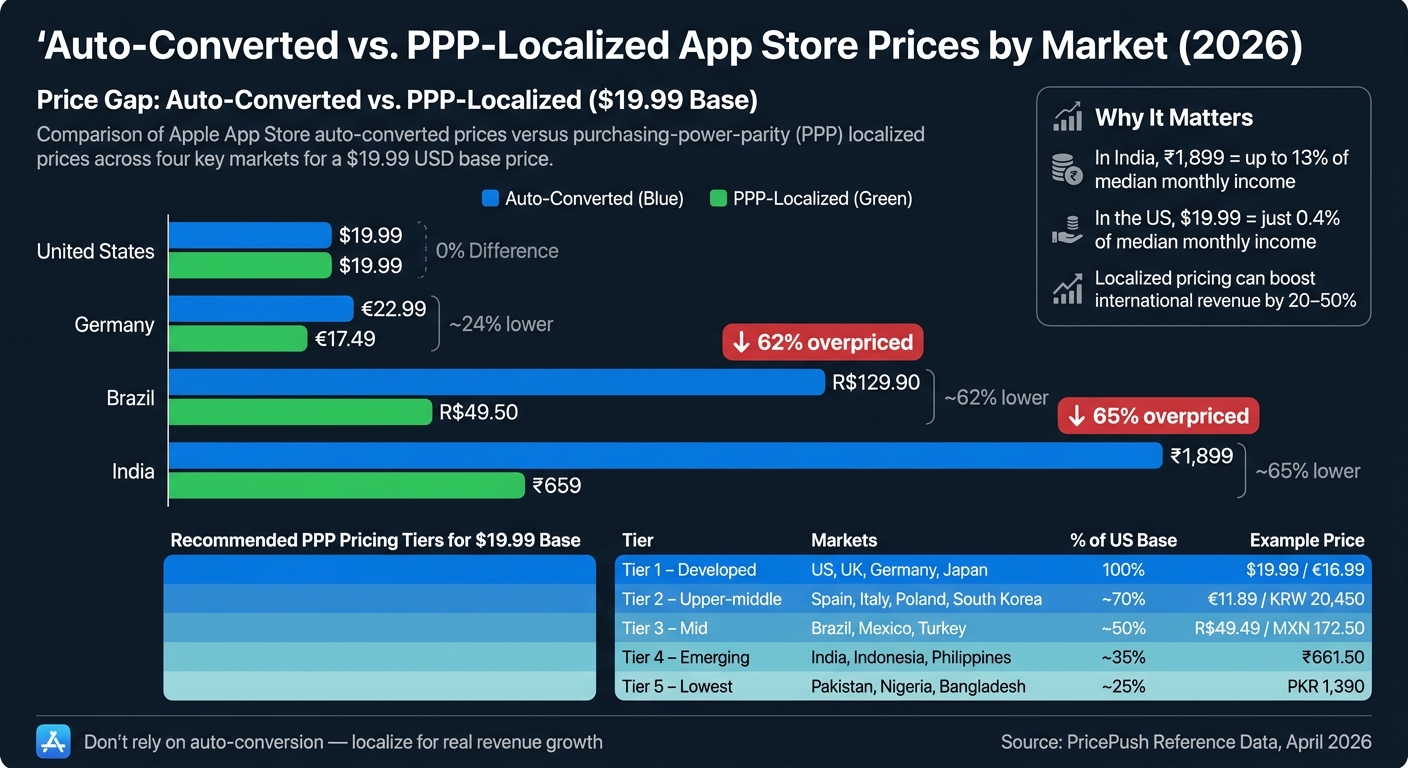
When Apple converts a $19.99 base price for other markets, it uses current exchange rates and incorporates local tax regulations. While this ensures the USD value is mirrored, it doesn't account for local purchasing power.
The gap between an auto-converted price and a purchasing-power-appropriate price can be 2x to 3x in exactly the markets where your app most needs to convert.
The table below illustrates the kind of differences that can emerge between auto-converted and purchasing-power-parity (PPP) localized prices for a $19.99 base tier:
| Market | Auto-Converted Price | Localized (PPP) Price | Difference |
|---|---|---|---|
| United States | $19.99 | $19.99 | 0% |
| Germany | €22.99 | €17.49 | ~24% lower |
| Brazil | R$129.90 | R$49.50 | ~62% lower |
| India | ₹1,899 | ₹659 | ~65% lower |
(Illustrative example, based on a $19.99 base tier)
In Germany, the localized price is about 24% lower than the US baseline, aligning with comparable purchasing power. However, the situation in Brazil and India is starkly different. For instance, in India, an auto-converted ₹1,899 (which includes an 18% Goods and Services Tax) can represent a far larger share of median monthly income than the same $19.99 does for a US user. This vast difference can turn a quick, impulsive buy into a carefully considered expense.
Brazil faces a similar challenge. The auto-converted R$129.90 is more than 2.5 times the PPP-adjusted price of R$49.50, primarily due to high VAT on digital services inflating the final price. Relying solely on automatic conversions in these markets can significantly hinder conversion rates.
How to Optimize Pricing for Global Revenue
Using Purchasing Power Parity (PPP) to Set Regional Prices
When dealing with the limitations of auto-converted prices in key markets, consider using Purchasing Power Parity (PPP) to fine-tune your regional pricing. PPP helps align prices with the relative affordability of each region, ensuring a fair balance for users worldwide. The formula is straightforward:
Country baseline = (PPP_country / PPP_base) × base_price.
Once calculated, round the results to the nearest valid Apple price tier. A tiered pricing strategy can then simplify scaling across multiple markets:
| Tier | Markets | % of US Base | $19.99 Example |
|---|---|---|---|
| Tier 1 – Developed | US, UK, Germany, Japan | 100% | $19.99 / €16.99 |
| Tier 2 – Upper-middle | Spain, Italy, Poland, South Korea | ~70% | €11.89 / KRW 20,450 |
| Tier 3 – Mid | Brazil, Mexico, Turkey | ~50% | R$49.49 / MXN 172.50 |
| Tier 4 – Emerging | India, Indonesia, Philippines | ~35% | ₹661.50 |
| Tier 5 – Lowest | Pakistan, Nigeria, Bangladesh | ~25% | PKR 1,390 |
(Illustrative tiering example for a $19.99 US base price)
Adapting to local conventions is key. For example, in India, prices like ₹650 or ₹699 feel more familiar, while in Japan, ¥500 or ¥1,000 are common. Similarly, Brazilian users expect prices with .90 endings. Keep in mind that once you manually set prices for a storefront in App Store Connect, Apple will no longer apply automatic FX or tax adjustments for that region [1]. To keep your pricing competitive, review them quarterly, or even more frequently in high-inflation markets like Turkey or Argentina.
Once your regional prices are set using PPP, the next step is finding tools to streamline the execution process.
Tools That Simplify Regional Pricing
Manually managing PPP adjustments across 175 storefronts is a daunting task. Even updating just five SKUs across major app stores can mean juggling well over a thousand individual price entries per refresh. Clearly, automation is essential.
Mirava simplifies this complexity by acting as an upstream pricing intelligence platform. It calculates optimal regional prices using proprietary indexes derived from real-world subscription data (e.g., Netflix, Spotify, Apple, YouTube), applies psychological rounding rules tailored to each market, and generates clean, batch-ready updates for iOS and Android. The platform also previews the potential revenue and conversion impacts of changes, allowing you to A/B test seasonal app pricing strategies, helping you make informed decisions with less guesswork.
"Value isn't universal - it's relative. You're not just competing with other apps, you're competing with the local economy." - Demian Voorhagen
Once Mirava identifies the right pricing strategy, tools like RevenueCat, Adapty, Purchasely, and Superwall handle the downstream execution. These platforms manage paywalls, subscriptions, and entitlements, complementing Mirava's pricing insights. Think of it as a two-layered system: pricing intelligence upstream, billing infrastructure downstream. Trying to use a billing tool to solve pricing challenges (or vice versa) often leads to inefficiencies.
Localized pricing can have a transformative impact, often delivering meaningful gains in international revenue in price-sensitive markets. This isn't just a minor improvement - it can turn underperforming regions into significant contributors to your bottom line.
Common Pricing Mistakes to Avoid in 2026
Effective pricing doesn't just involve setting competitive rates; it also requires avoiding common missteps that can undermine your revenue.
Choosing the Wrong Base Country
Your base country is far more than a default setting. It serves as the foundation Apple uses to calculate prices across 174 storefronts and 43 currencies [1][4]. Selecting the wrong base country can lead to misaligned auto-converted prices globally.
One frequent error is overlooking the tax implications of your chosen base country. For instance, if you pick a country with high VAT baked into App Store prices, the auto-converted prices in other markets may end up distorted. This can have a ripple effect, impacting pricing consistency across regions.
Changing the base country later isn’t a quick fix either - it resets all scheduled price changes [4]. To avoid disruptions, make this decision carefully from the start.
By understanding the role of your base country, you can better navigate Apple’s automatic price updates and maintain pricing alignment.
How Apple's Automatic Price Updates Work
Apple periodically adjusts regional prices to reflect changes in taxes or significant currency fluctuations. However, the way these updates work can be easy to misinterpret.
A key point to note: Apple does not automatically adjust prices for auto-renewable subscriptions, even when tax rates or exchange rates shift [7]. Managing subscription pricing is entirely up to you. For example, in January 2026, Apple implemented tax and price updates in nine countries. Developers with subscriptions in these markets who didn’t stay on top of the changes saw their margins shrink.
For non-subscription in-app purchases and app prices, Apple does make automatic adjustments. Developers are given at least 14 days’ notice before these changes take effect [1]. In App Store Connect, these updates are tagged as either "Foreign Exchange" or "Tax Rate Adjustment", while prices you set manually are labeled "Manually Adjusted" [8]. Remember, once you manually adjust a price for a storefront, Apple stops applying its automatic updates.
Once you manually set a price for a storefront, Apple stops updating it automatically. That's good for control, but easy to forget - leaving prices to drift if you don't revisit them.
To stay ahead, consider conducting quarterly reviews for most markets. In regions with high inflation, like Turkey or Argentina, monthly spot-checks are a smart practice.
Calculating Net Revenue After Apple's Commission
Setting competitive prices is only part of the equation. You also need to accurately calculate your net revenue to fully understand your global earnings potential.
Many developers fail to account for the impact of Apple’s commission, local taxes, and regional price variations on their actual revenue. Apple’s standard commission is 30%, but there are two notable exceptions: the App Store Small Business Program and year-2+ subscription renewals, both of which qualify for a reduced 15% rate. In March 2026, Apple also introduced lower commission rates for China - 25% for standard in-app purchases and 12% for Small Business Program members and year-2+ subscriptions.
To track your earnings accurately, rely on the "Developer Proceeds" column in App Store Connect’s Sales and Trends reports. This figure reflects your revenue after Apple’s commission and taxes are deducted, giving you a clear picture of your actual earnings. Regular quarterly reviews are essential to ensure that tax changes in manually managed storefronts don’t quietly erode your margins over time.
Conclusion: Getting More from Apple's Price Tiers
Maximizing global revenue begins with thoughtful pricing decisions. Apple's 900-point pricing system offers developers plenty of flexibility, but its true value comes from deliberate application. The difference between relying on auto-converted prices and setting localized ones can make or break sales, especially in price-sensitive markets like India, Brazil, and Turkey.
The key message is clear: don’t rely solely on Apple’s default auto-conversion. Choose a strategic base country, manually adjust prices in markets with high potential using purchasing power parity (PPP) as a guide, keep SKU pricing consistent, and revisit your pricing at least every quarter. These actions can drive sustained growth. To make the most of this approach, having the right pricing and billing tools in place is essential. App Store pricing by country remains one of the highest-leverage settings most developers never touch.
Mirava serves as the pricing intelligence layer that works upstream of tools like RevenueCat, Adapty, Purchasely, and Superwall. By determining the most effective prices before these platforms handle billing and entitlements, Mirava helps developers turn global market trends into steady revenue streams. Aligning prices with local purchasing power at every stage is what separates those who simply reach global markets from those who turn that reach into meaningful revenue.
FAQs
When should I set custom country prices instead of using Apple’s automatic pricing?
Set custom prices for different countries to align with local purchasing power instead of depending solely on exchange rates. Apple's automatic pricing often leads to prices that are out of reach for users in regions such as Brazil, India, or Turkey. With Mirava, you can determine the most suitable local pricing and apply it directly at the store level, where tools like RevenueCat, Adapty, Purchasely, or Superwall read it automatically. Taking this approach can lead to higher conversion rates and increased revenue in important markets.
How do I choose the best base country for my app’s pricing?
When deciding on the ideal base country for pricing, start by pinpointing where your app sees the highest downloads and revenue - this market will influence how your prices scale worldwide. While the United States is often the go-to choice due to its stable baseline, it’s more effective to select a country that matches your core audience and aligns with your product-market fit. To fine-tune pricing beyond Apple’s default exchange rates, consider tools like Mirava, which updates prices directly at the store level so platforms like RevenueCat or Superwall read them automatically for billing and paywalls.
What’s the safest way to update subscription prices when taxes or exchange rates change?
The most reliable way to maintain your global subscription pricing strategy is by reviewing it every quarter. Apple doesn’t automatically adjust subscription prices to reflect changes in taxes or exchange rates, so it’s up to you to update them manually in App Store Connect.
Mirava can help you identify the best market-specific pricing using Purchasing Power Parity (PPP) as a guide. Once you’ve set your pricing, tools like RevenueCat, Adapty, Purchasely, or Superwall read the updated store prices automatically to handle billing and paywall management efficiently.