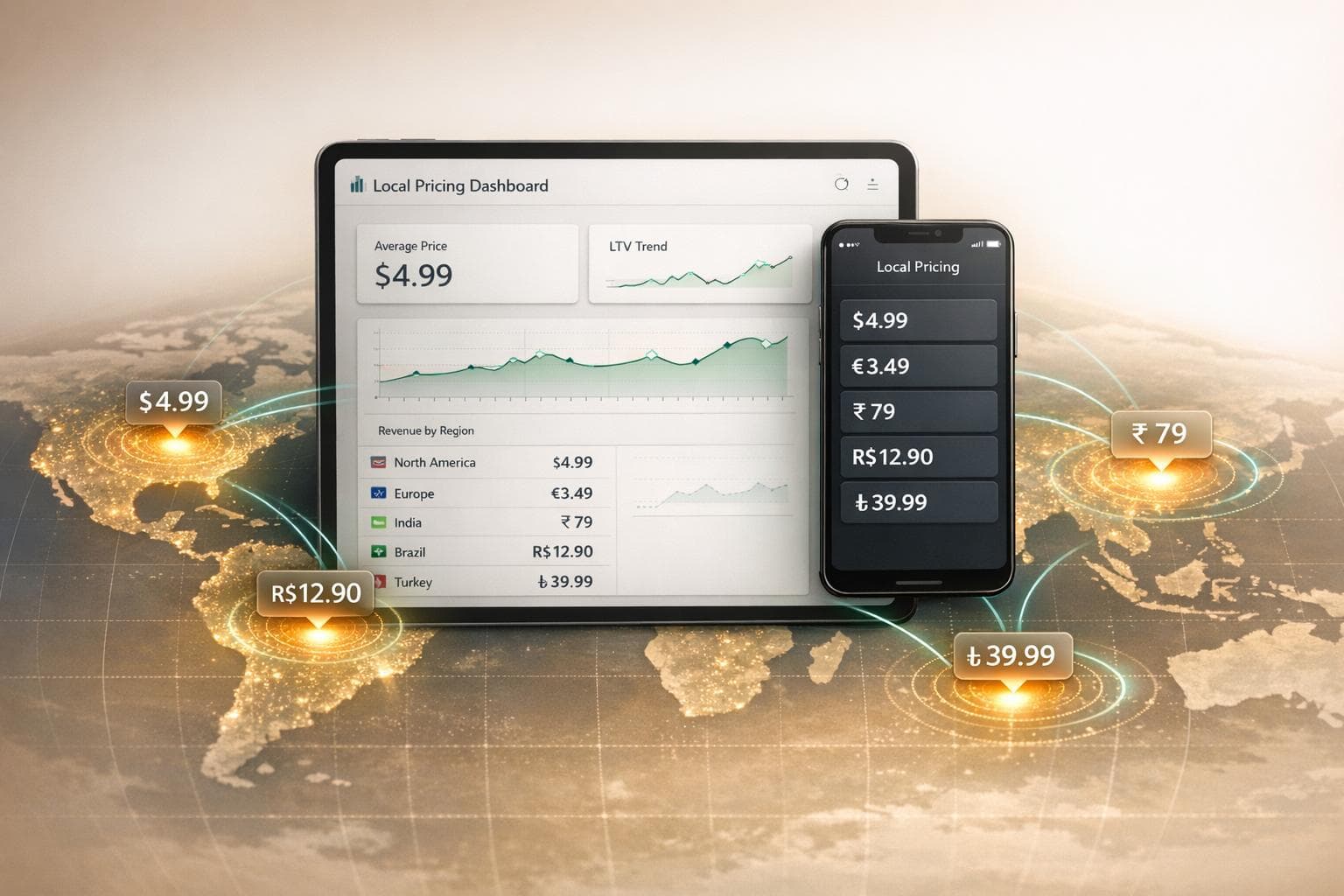
Localized pricing isn't just about converting currencies - it’s about aligning your app's prices with the purchasing power of users in specific regions. A generic $19.99 subscription might feel affordable in the U.S. but becomes unaffordable when auto-converted to ₹1,659 in India or ₺680 in Turkey. By tailoring prices to match local spending habits, you can grow conversions and revenue without increasing traffic.
Key takeaways:
- Localized pricing adjusts for local purchasing power, unlike basic currency conversions.
- Apps using this strategy have seen results like tripling their paying user base or doubling subscriptions in new markets.
- Apple App Store uses fixed price tiers, while Google Play allows flexible pricing but requires more manual work.
- Tools like Mirava streamline pricing updates across platforms, syncing prices with subscription tools like RevenueCat or Adapty.
How to price your subscription app globally - Featuring Jacob Rushfinn
sbb-itb-43fe43a
Localized Pricing for Mobile Apps: The Basics
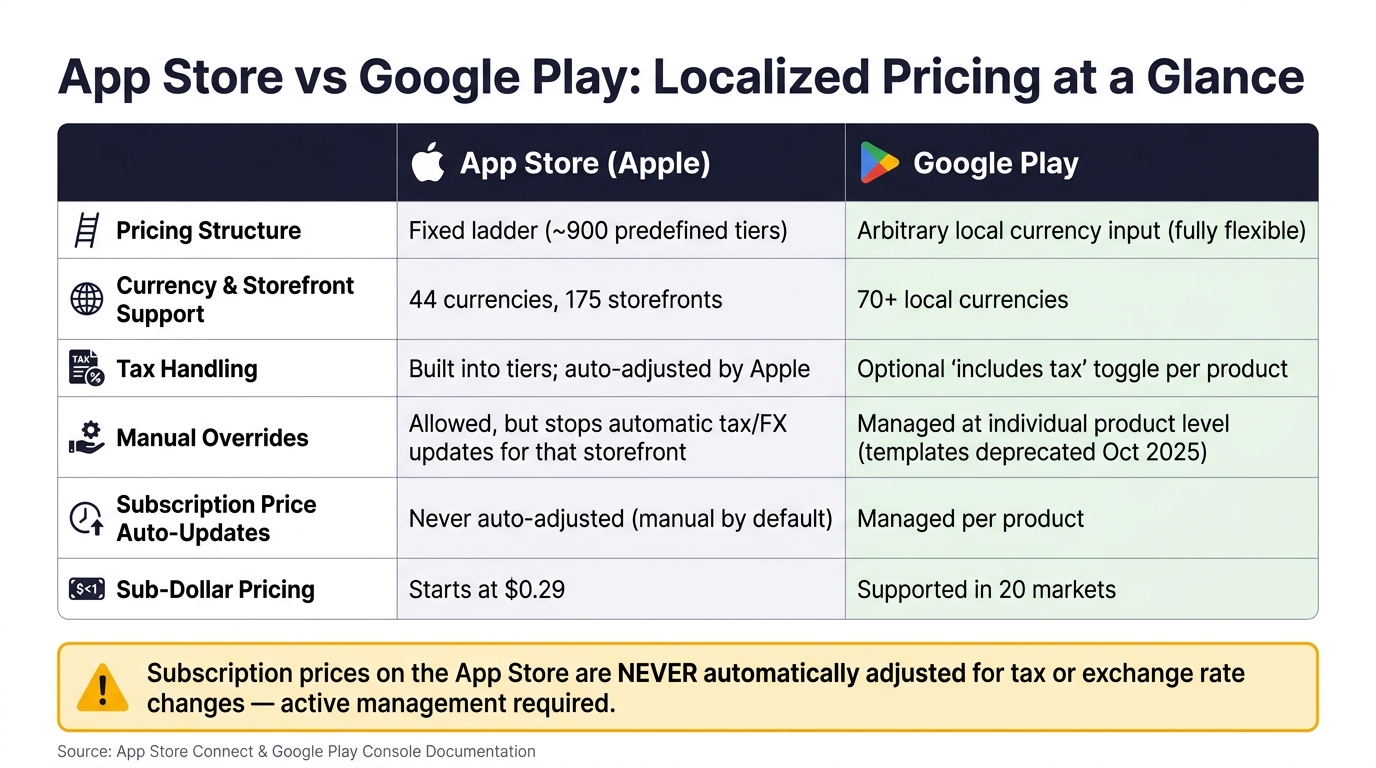
App Store vs Google Play: Localized Pricing Features Compared
What Is Localized Pricing?
Localized pricing involves setting prices tailored to a specific country, reflecting what users in that region can realistically afford, rather than simply converting your base price using the current exchange rate. This approach goes beyond currency conversion, addressing the economic realities of each market.
For example, when a store converts $19.99 into Indian rupees, it's performing straightforward currency math. Localized pricing, however, considers what Indian users perceive as a fair price based on their income levels and spending habits. This localized figure is often much lower than a direct conversion. Antonio Cappiello, Founder of PricePush, sums it up perfectly:
"Currency conversion holds your dollar value constant. Localized pricing holds the user's purchasing power constant." [13]
The concept of Purchasing Power Parity (PPP) helps explain this. PPP measures how much local currency is needed to buy the same goods as one U.S. dollar. In India, for instance, the PPP conversion factor is around 22–25 INR per international dollar, while the market exchange rate hovers at approximately 83 INR/USD [2][6]. This discrepancy highlights why auto-converted prices often feel out of reach for users in lower-income regions.
The benefits of localization are clear. Take Flo, a period tracking app, as an example. By adjusting its prices in Brazil to align with local purchasing power and leveraging cheaper local ad inventory, Flo turned Brazil into its third-largest market. This strategy contributed to 80% growth in non-English-speaking markets over a single year, demonstrating why purchasing power parity pricing is a must for global expansion [1]. This success showcases how localized pricing can outperform simple currency conversion. Next, let’s examine how price tiers differ between Apple and Google to help you apply this strategy effectively.
How Price Tiers Work on App Store and Google Play
To implement localized pricing, it’s crucial to understand how the pricing systems on Apple’s App Store and Google Play differ.
Apple's App Store operates on a fixed "price point ladder", offering around 900 predefined price tiers per currency. Prices range from $0.29 to $9,999.99. Developers set a base country price, and Apple calculates equivalent prices for its 174 storefronts across 44 currencies. While you can manually override these prices, you must stick to Apple’s predefined tiers, as custom values aren’t allowed [2][10]. Keep in mind, if you manually adjust prices for a country, Apple will no longer handle automatic tax and exchange rate updates for that storefront, leaving those responsibilities to you [10][11].
Google Play, on the other hand, allows complete flexibility. Developers can input any value in local currencies across its 70+ supported currencies - no fixed tiers required [2][12]. While this flexibility is helpful, it also brings more manual work. As of October 2025, Google retired its pricing templates, meaning all adjustments must now be made at the individual product level [9].
Tax handling also varies between the two platforms. Apple includes local taxes in its price tiers and automatically updates them when tax laws change. For example, in January 2026, Apple adjusted prices in nine countries to reflect a new 15% VAT in Mauritius and a 4% VAT increase in Kazakhstan [2][11]. Google, on the other hand, provides a toggle option for developers to decide whether their entered price includes tax. This feature is especially useful for maintaining uniform consumer-facing prices (like €9.99) across EU countries with different VAT rates [9].
| Feature | App Store (Apple) | Google Play |
|---|---|---|
| Pricing structure | Fixed ladder (~900 tiers) | Arbitrary local currency input |
| Currency support | 44 currencies, 175 storefronts | 70+ local currencies |
| Tax handling | Built into tiers; auto-adjusted by Apple | Optional "includes tax" toggle |
| Manual overrides | Stops automatic tax/FX updates | Prices managed per product |
| Price management | Base price + per-country overrides | Individual product level (templates deprecated Oct 2025) |
One important note: subscription prices on the App Store are never automatically adjusted for tax or exchange rate changes, regardless of whether you’ve set manual prices. This makes subscriptions inherently "manual by default", which can lead to unnoticed revenue losses if not actively managed [11].
Data-Driven Methods for Setting Local Prices
Using PPP and Pricing Indices
Purchasing Power Parity (PPP) provides a solid starting point for pricing in different markets. The calculation is simple: take your base price and adjust it by multiplying with the PPP ratio of the target country relative to your home market. For example, a US-based app priced at $19.99 would translate to approximately ₹659 in India, R$49.90 in Brazil, and ₺299 in Turkey [2][13]. While PPP serves as a useful benchmark, it doesn’t capture the nuances of digital spending habits. That’s where pricing indices based on actual digital service prices come into play. These indices reflect real-world purchasing behaviors, offering a more precise guide for pricing adjustments [13][1].
Mirava’s pricing indices leverage data from platforms like Netflix, Spotify, Apple, and YouTube to create a detailed picture of what users are willing to spend in various markets. Acting as an intelligence layer, these indices help determine optimal pricing, which tools like RevenueCat, Adapty, Purchasely, and Superwall can then apply to paywalls, trials, and entitlement setups.
After establishing a baseline price, fine-tune it to match local pricing conventions. For instance, US users are accustomed to prices like $19.99, while in India, ₹499 or ₹999 feels more natural. In Japan, whole numbers like ¥1,500 or ¥2,000 are preferred, as decimals like ¥1,499 can seem out of place [2]. These subtle adjustments help signal that your pricing is tailored to the local market.
Once your prices are set, monitor key metrics to assess whether your localization efforts are hitting the mark.
Key Metrics for Localization Decisions
PPP provides a starting point, but it’s the performance metrics that confirm whether your pricing adjustments are working. Focus on the following indicators: ARPU (average revenue per user), ARPPU (average revenue per paying user), trial-to-paid conversion rate, and churn rate by region.
There’s a noticeable disparity in revenue per install between regions. For example, at Day 60, North America averages around $0.55 per install, while markets like India or Southeast Asia hover closer to $0.11 [3]. This gap highlights the importance of pricing adjustments rather than serving as a deterrent. A lower price point in these regions can lead to a 60% increase in conversion rates, which often compensates for the reduced margin [6]. As RevenueCat aptly explains:
"Raising prices in high-income countries and lowering them in low-income countries - done at the same time - almost always increases total revenue." [6]
Tracking these metrics at the country level ensures you’re making informed decisions rather than relying on guesswork. To refine your strategy further, validate your pricing hypotheses through targeted pricing experiments.
Testing and Validating Local Prices
Before rolling out new prices in a market, two complementary methods stand out: A/B testing and the Van Westendorp Price Sensitivity Meter.
A/B testing allows you to compare current prices with localized ones over a 7–14 day period, measuring key metrics like conversion rates, ARPPU, and churn [2]. Meanwhile, the Van Westendorp model uses survey data to identify four price thresholds: too cheap, a bargain, getting expensive, and too expensive. The intersection of these thresholds reveals the optimal price point for that market [1].
How to Set Up Localized Pricing on App Store and Google Play
Setting Up Localized Pricing on App Store
Apple uses a 900-point pricing ladder across 175 storefronts in 44 currencies [2][14]. Instead of entering a specific price, you choose a point on this ladder, and Apple calculates equivalent prices for other storefronts based on exchange rates and taxes. This complexity highlights how subscriptions raise app costs through management overhead and platform fees.
To configure localized pricing in App Store Connect:
- Access Pricing and Availability: Head to the Monetization section.
- Add Pricing: Click Add Pricing and select a Base Country (often the US for developers).
- Set a Base Price: Choose a price from the 900-point ladder.
- Review and Adjust: Check the auto-generated prices and manually adjust for markets requiring purchasing power parity (PPP) corrections [10][14].
Auto-generated prices can sometimes miss the mark, especially in price-sensitive regions. For example, Apple's default conversions might set prices too high in markets like India, requiring manual adjustments to better reflect local purchasing power [11]. Subscription pricing, in particular, needs manual updates. Apple periodically adjusts prices for tax changes - such as the introduction of a 15% VAT in Mauritius in January 2026 - but these updates only apply to apps using automatic pricing [2][11].
Setting Up Localized Pricing on Google Play
Google Play offers greater flexibility compared to Apple's fixed pricing ladder. Developers can input any local currency amount without adhering to predefined tiers [2].
Here's how to set up localized pricing in Google Play Console:
- Navigate to Products, then App pricing, and click Set pricing to enter a base price. Google will calculate local equivalents automatically.
- To adjust pricing for specific countries, click the pencil icon in the "Price" column for that market [9].
- Use the Price conversion tab under Monetization to view Google's suggested local prices based on purchasing power data [5].
- Google also supports sub-dollar pricing in 20 markets, which can be helpful in regions where even $0.99 might be too high [9].
As of October 2025, Google discontinued pricing templates, meaning all adjustments must now be made individually or through the onetimeproducts service [9].
Given the need for regular updates on both platforms, automating these processes becomes increasingly important.
Automating and Scaling Price Updates
Managing localized pricing across platforms can quickly become overwhelming. For example, a single app with five SKUs across 175 Apple storefronts and Google Play could require updating as many as 1,750 price cells per refresh [13]. Automation tools simplify this process significantly. Antonio Cappiello, Founder of PricePush, explains:
"For a single app across 175 Apple storefronts, a careful review is a half-day of manual price grid reviews. Automation turns it into a diff view." [2]
Automation tools like Mirava streamline these updates by acting as a pricing intelligence layer. They connect to App Store Connect, Google Play Console, and web billing tools via API. By running analyses like PPP and foreign exchange drift, they generate tailored price recommendations. Mirava also provides a side-by-side "Old vs. New" preview with rounding logic to ensure accurate pricing. Once approved, these updates sync automatically across platforms and tools like RevenueCat, Adapty, Purchasely, and Superwall, eliminating the need for extra SDK changes or engineering work [4][7].
"When pricing lives separately in App Store, Google Play, Stripe, RevenueCat and internal tools, small changes become risky and slow." - Mirava [7]
Most teams adopt a quarterly review cycle for stable markets, while high-inflation regions like Turkey and Argentina often require monthly checks [2][11]. While automation handles much of the heavy lifting, human oversight remains critical for fine-tuning strategies as market conditions shift.
Localized Pricing Strategies for Key Markets
While automated systems can handle price updates, crafting effective local pricing strategies is essential for navigating the unique challenges of different markets. India, Brazil, and Turkey stand out as case studies due to their distinct hurdles: scale, currency instability, and inflation, respectively.
India: Addressing Price Sensitivity
India, with its massive app install base, requires a pricing approach tailored to a highly cost-conscious audience. Auto-converted subscription prices, often around ₹830, are seen as too expensive by many users, making it difficult to drive conversions [6]. Adjusting prices to a more affordable range, typically between ₹230 and ₹280 (PPP-adjusted), helps position the app as a practical utility rather than a luxury [6].
The gap between default and optimal pricing can be surprising. While standard recommendations suggest a 21% price cut, successful apps often go further, reducing prices by 50–80% [1]. Pricing presentation also plays a critical role. Figures like ₹1,659.17, derived from direct FX conversions, feel out of place and can undermine trust. Instead, prices ending in 99 - like ₹499 or ₹999 - resonate better, aligning with local consumer expectations [2].
"Setting ₹1,659 in India because that's the closest price tier to the $19.99 FX conversion is the same trap wearing a different hat. You picked a rupee number; you didn't pick a rupee price." - Antonio Cappiello, Founder, PricePush [2]
Mirava simplifies this process by automating these rounding adjustments, ensuring developers can focus on growth without worrying about local pricing norms.
Brazil: Navigating Currency Volatility
Brazil's app market is expanding rapidly - non-gaming app spend recently grew by 31% [1]. However, the Brazilian real (BRL) is prone to depreciation, which can distort pricing [1]. Despite lower revenue per user, the significantly lower costs for advertising and marketing in Brazil often balance the scales, making localized pricing viable [1].
One example is the period-tracking app Flo, which adopted a strategy of substantially lowering prices in Brazil. This approach not only maintained profitability but also made Brazil one of its top-performing markets, contributing to 80% growth in non-English-speaking regions over a year [1]. Additionally, using local formatting conventions, such as a comma as the decimal separator (R$19,99 instead of R$19.99), reinforces professionalism and builds trust with users [2].
A quarterly review of pricing generally suffices in Brazil. However, during periods of economic or political instability, closer monitoring of BRL fluctuations is prudent [15].
Turkey: Managing Rapid Currency Changes
Turkey presents the steepest challenge among these markets due to its high inflation and swift currency shifts. For context, a median net income of around ₺23,000 makes an FX-converted subscription price of ₺760 a substantial 3% of monthly income, compared to just 0.4% for a US user paying $19.99 [2]. To address this, prices must be set aggressively relative to local incomes and reviewed monthly [15].
Turkish pricing conventions also differ from India’s. Rounding to the nearest ten or twenty-five (e.g., ₺99, ₺125) is preferred over the 99-ending format [2]. Mirava’s automated workflows flag significant currency shifts, ensuring prices remain aligned with local conditions without requiring constant manual oversight.
| Market | Recommended Review Cadence | Rounding Convention | Key Challenge |
|---|---|---|---|
| India | Quarterly | Ends in 99 (e.g., ₹499) | Large PPP gap vs. FX rate |
| Brazil | Quarterly | Comma as decimal (R$19,99) | Cyclical BRL depreciation |
| Turkey | Monthly | Round tens/twenty-fives | Swift inflation |
Connecting Pricing Intelligence with Subscription Tools
Mirava as the Pricing Intelligence Layer
Subscription tools like RevenueCat, Adapty, Purchasely, and Superwall excel at managing billing, paywalls, and entitlements, but they don’t tackle pricing. That’s where Mirava steps in, serving as a pricing intelligence layer that operates upstream. By leveraging purchasing power parity (PPP) data and regional affordability benchmarks, Mirava calculates optimal prices for over 170 countries. These prices are then pushed directly to App Store Connect and Google Play Console, streamlining the process [7].
What makes this especially seamless is how platforms like RevenueCat and Adapty automatically detect these store-level price changes. There’s no need for SDK updates, code deployments, or new webhooks. This ensures your existing paywalls, A/B tests, trial setups, and entitlement logic remain unaffected.
"Mirava updates prices at the store level. Tools like RevenueCat and Adapty read those changes automatically, so your paywalls, trials and entitlement logic stay exactly as they are." - Mirava [7]
By connecting pricing intelligence with subscription tools, Mirava ensures that market dynamics are reflected in your pricing without disrupting your subscription infrastructure.
Keeping Prices Consistent Across Platforms
One of the biggest challenges with localized pricing is the risk of platform drift - where pricing discrepancies across iOS, Android, and web can erode user trust. Mirava solves this by unifying your products, SKUs, and subscription tiers from App Store Connect, Google Play Console, and Stripe into a single dashboard [4]. This dashboard allows you to manage pricing by tier, country, and platform, ensuring users see consistent pricing no matter where they interact with your product [7].
"Pricing becomes a separate, safer layer your team can manage without shipping code." - Mirava [7]
Mirava also handles currency mapping automatically, reconciling differences like territories quoted in USD on the App Store but in local currency on Google Play [2]. This eliminates inconsistencies and ensures a smooth user experience across platforms.
Approval Workflows for Price Updates
Updating prices across more than 170 countries can be risky - small errors in rounding or conversion can lead to significant pricing misalignments. To address this, Mirava includes an approval workflow that previews "Old vs. New" prices for every country. This preview incorporates rounding logic and estimates the revenue impact, ensuring accuracy before prices go live [4]. No updates are published without explicit team sign-off.
This workflow not only reduces the risk of errors but also fosters collaboration between growth, product, and finance teams. By removing the need for engineering involvement, teams can make informed pricing decisions while staying compliant with Apple and Google’s pricing guidelines [7].
Additionally, the approval process creates a detailed audit trail. If a price adjustment underperforms in a specific market, you’ll have a clear record of what was changed, when, and why. This makes it easier to quickly adapt and refine your pricing strategy.
Measuring the Results of Localized Pricing
Measuring performance is essential to refining your localized pricing strategy and ensuring it stays aligned with market dynamics.
Key Metrics to Track
When evaluating localized pricing, don't rely solely on total revenue, as it can fluctuate due to factors like seasonal trends or advertising spend. A more reliable indicator is the install-to-purchase conversion rate by territory. For instance, if conversion rates in India are significantly lower than in Canada, Australia, or the US, it suggests a pricing issue rather than a product flaw.
"If your conversion rate in India is five times lower than in Canada, Australia, or US, well, there's some mismatch, right?" - Jacob Rushfinn, Founder, Rushfinn Consulting [1]
Beyond conversion rates, focus on ARPU (Average Revenue Per User) and ARPPU (Average Revenue Per Paying User). In regions with lower revenue per transaction, higher volume might compensate - ARPPU helps evaluate whether this tradeoff is effective. Additionally, monitor churn and refund rates; sudden increases in either could signal pricing missteps.
| Metric | What It Tells You |
|---|---|
| Install-to-Purchase Rate | If pricing is a barrier to entry in a specific market |
| ARPU / ARPPU | Whether volume gains offset lower per-user revenue |
| Churn Rate | If price changes are driving cancellations |
| Refund Rate | Indicators of buyer's remorse or price sensitivity |
| Support Ticket Volume | Early warnings of pricing or display-related issues |
These metrics provide clear signals for when pricing adjustments are needed.
Adjusting Prices Based on Market Changes
Localized pricing isn't a one-and-done task; it requires continuous monitoring and adjustments. Shifts in exchange rates, purchasing power parity (PPP) data, and tax regulations can all impact pricing. For example, tax changes in a specific region demand prompt reviews to avoid unexpected revenue dips. Ignoring these shifts can lead to a gradual erosion of your effective earnings.
A good maintenance routine might include quarterly reviews for most regions, monthly checks for high-inflation markets like Turkey or Argentina, and ad-hoc reviews when Apple or Google announces tax or pricing tier updates. To ease transitions during price increases, Apple's "Preserve Price" feature can help by maintaining existing rates for current subscribers while applying new rates only to new users [5].
"Pricing tests take a long time: You need to evaluate long-term monetization, not just short-term revenue bumps. It usually takes 3–6 months to understand the full impact on retention and LTV." - Daphne Tideman, Growth Expert [1]
How Mirava Supports Ongoing Optimization
Once performance is tracked, refining prices becomes the next step. Mirava's dashboard simplifies this process by offering a clear view of price history across all markets. It highlights when and why a price changed, whether due to currency fluctuations or manual edits. Before finalizing updates, Mirava provides a revenue impact preview, projecting changes in conversion and total revenue. This allows teams to make data-driven decisions confidently. Additionally, its approval workflow ensures a documented trail of changes, enabling quick refinements without requiring extensive engineering resources. With Mirava, you can test, measure, and adjust your pricing strategy efficiently and effectively.
Conclusion
Setting regional pricing based on local purchasing power, rather than just converting currencies, is critical for mobile developers aiming to grow globally. True localization ensures pricing resonates with users in each market, making apps more accessible and competitive.
Relying solely on default currency conversions often misses the mark, especially in markets like Brazil and Turkey, where economic conditions can shift rapidly. Regular monitoring and aligning prices with local rounding practices not only build user trust but also enhance the perceived value of your app.
The benefits are clear. Adjusting prices in regions where your app feels overpriced can drive 15–30% more trials and paid conversions without increasing traffic [8]. When pricing reflects local spending habits, the results are undeniable.
To bring this strategy to life, Mirava acts as the pricing intelligence layer, analyzing data from over 170 countries to recommend optimal price points. Once prices are set, platforms like RevenueCat, Adapty, Purchasely, and Superwall manage billing, paywalls, and entitlements seamlessly. Together, these tools form a robust monetization system.
This highlights the importance of ongoing pricing adjustments. Regular reviews - quarterly for most markets and monthly for high-inflation regions - ensure your pricing stays relevant. With a structured approach, the financial gains from these efforts will continue to grow over time.
FAQs
How do I pick a local price that won’t hurt revenue?
To determine a local price that preserves revenue, rely on Purchasing Power Parity (PPP) rather than exchange-rate conversions, which can lead to inflated prices in emerging markets. Start by multiplying your base price by the local PPP factor. Then, adjust the result to align with pricing conventions in the region, such as rounding to amounts that end in 99. Tools like RevenueCat, Adapty, Purchasely, or Superwall can help with implementation. Keep an eye on key metrics like conversion rates and ARPU to fine-tune your pricing strategy.
When should I override store auto-converted prices?
When relying on store-managed auto-converted prices, you might miss out on key opportunities to fine-tune pricing for purchasing power parity (PPP), local price expectations, or competitive dynamics. Auto-conversion often depends solely on exchange rates, which can lead to awkward pricing - think unattractive decimals or figures that don’t align with local spending habits. Adjusting prices manually allows you to implement strategies like charm pricing, ensuring they resonate better with regional norms. Tools like Mirava, in collaboration with platforms such as RevenueCat or Adapty, enable you to maintain a consistent and well-optimized pricing approach across global markets.
How can I keep iOS, Android, and web prices consistent?
To keep pricing aligned across iOS, Android, and web, steer clear of manual updates or relying solely on platform-native currency conversion tools. These methods often fail to account for fluctuations in exchange rates and overlook differences in local purchasing power. Instead, implement a centralized pricing intelligence layer to determine the best market-specific prices. This setup allows you to push these prices directly to the App Store and Google Play via APIs. Platforms like RevenueCat, Adapty, Purchasely, or Superwall can then manage billing and paywalls effortlessly across all platforms.