If you set the same $9.99 or $19.99 price on both stores, customers will often see different local prices. I’d treat that as the main takeaway from the start.
Here’s the short version:
- Apple uses fixed price tiers by storefront
- Google Play lets me set direct local-currency prices
- That means India, Brazil, and the UK often show different customer prices for the same U.S. anchor
- A U.S. $19.99 price can land near ₹1,899 by FX-style conversion, while a market-fit price may be closer to ₹661.50
- In the UK, the gap can still be about 26%
- Once I override local prices on either store, I need to review them myself as FX and tax shift
- RevenueCat, Adapty, Purchasely, and Superwall help with billing and paywalls, but Mirava sits earlier in the stack as the pricing intelligence layer
What matters in practice is simple: currency conversion is not the same as localisation. If I want cleaner parity across stores, I need to compare Apple’s tier points against Google Play’s country prices, then set market-fit numbers on purpose.
How to price your subscription app globally - Featuring Jacob Rushfinn
sbb-itb-43fe43a
Quick Comparison
| Area | Apple App Store | Google Play |
|---|---|---|
| Price setup | Fixed tier ladder | Direct local pricing |
| Country control | Storefront override, still tied to Apple price points | Manual country-level price setting |
| Default logic | Tier mapping by storefront | FX-based local conversion |
| Rounding | Apple decides local endings | I can choose local price points |
| Drift over time | Happens after manual overrides | Happens after manual overrides |
| Best use | Clean tier-based catalogue control | Tighter country-by-country pricing |
If I had to sum it up in one line: Apple is tier-led, Google is price-led, and parity breaks in the gap between those two systems.
Google Play: Country-level pricing and local currency control
Google Play starts with a developer-set base price, then calculates local prices using the exchange rate on the day that price goes live [1]. Unlike Apple, Google also lets developers set prices at the country level. After that, Google rounds to local price endings, so pricing patterns vary by market: India may end in .50, Brazil often in .90, and Japan usually uses whole numbers [1].
That freedom is a big reason Google Play prices can drift away from Apple’s in the same country.
How Google generates local prices from a base price
By default, Google’s auto-generated pricing follows exchange rates, not local purchasing power. So a $19.99 U.S. price might convert to about ₹1,899 in India, even though a price tuned to what users can more easily pay there would be closer to ₹659 - about 65% lower.
In plain terms, Google aims for currency conversion accuracy, not what feels affordable in each market. For apps selling subscriptions or high-ticket IAPs, that gap can hit hard in price-sensitive regions.
How developers can override prices by market
If the auto-generated number misses the mark, Play Console lets developers override pricing manually by country and by product. That means you can set amounts like ₹487 in India, R$49.90 in Brazil, or £14.90 in the UK, as long as they stay within local currency rules and Google’s price floors and ceilings.
This is where Google Play gives pricing teams more room to work. You can hold a cleaner psychological price point, match local buying behaviour, or keep parity with other channels instead of letting exchange-rate swings do the work for you.
There’s a trade-off, though. Once you apply a manual override, Google stops auto-adjusting that price. Stability is good, but FX moves can create drift over time. A market that looked well priced six months ago can end up too high or too low, which is why it makes sense to review overridden markets every quarter.
Google also deprecated Pricing Templates on October 27, 2025. Bulk price changes now need to happen per product or through the Play Developer API [1].
That direct country-level control is the clearest contrast with Apple’s tier-based pricing model, which comes next.
Apple App Store: Price tiers, storefront mapping, and custom price points
Google Play lets you set prices by country. Apple works differently. It maps each storefront to a fixed tier ladder, with set price points across currencies and regions. You choose a tier, and Apple applies that tier across territories.
How Apple price tiers work across storefronts
In App Store Connect, you start by picking a reference storefront. Apple then converts that tier into local prices for every other territory. Those conversions reflect exchange rates and tax, but they don’t account for local willingness to pay [2].
That gap matters. Apple’s default recommendation for India lands about 21% below the U.S. price [2]. In practice, many teams price India 50% to 80% below U.S. levels to stay closer to what users will pay [2].
You can see the pattern in markets like India and Brazil:
| Market | Tier 1 | Tier 10 | Tier 20 |
|---|---|---|---|
| United States | $0.99 | $9.99 | $19.99 |
| India | ₹79 | ₹799 | ₹1,599 |
| Brazil | R$4.90 | R$49.90 | R$99.90 |
These are the local price points you need to line up with Google Play’s country-level pricing.
Tier selection vs. manual storefront pricing
Apple doesn’t force you to stick with its default mapping. You can override pricing by storefront, but there’s a catch: each override still has to sit on one of Apple’s tier rungs. So if you want to charge ₹449 in India, you may hit a wall if that exact point isn’t on the ladder.
Once you set a custom storefront price, Apple stops updating it when exchange rates or tax change [3]. In other words, that price stays fixed until your team changes it manually. That’s one reason pricing drift shows up over time, especially across large catalogues. Even so, about 40% of brands still rely on Apple’s default localisation settings [2].
For teams using RevenueCat, Adapty, or Purchasely to manage billing and paywalls, this is where the split becomes clear: those tools handle delivery well, but the pricing decision still sits upstream. If your Apple storefront overrides aren’t checked on a regular basis, you can end up with clean billing ops and weak regional pricing at the same time.
Where price parity breaks: Apple tiers vs. Google local prices
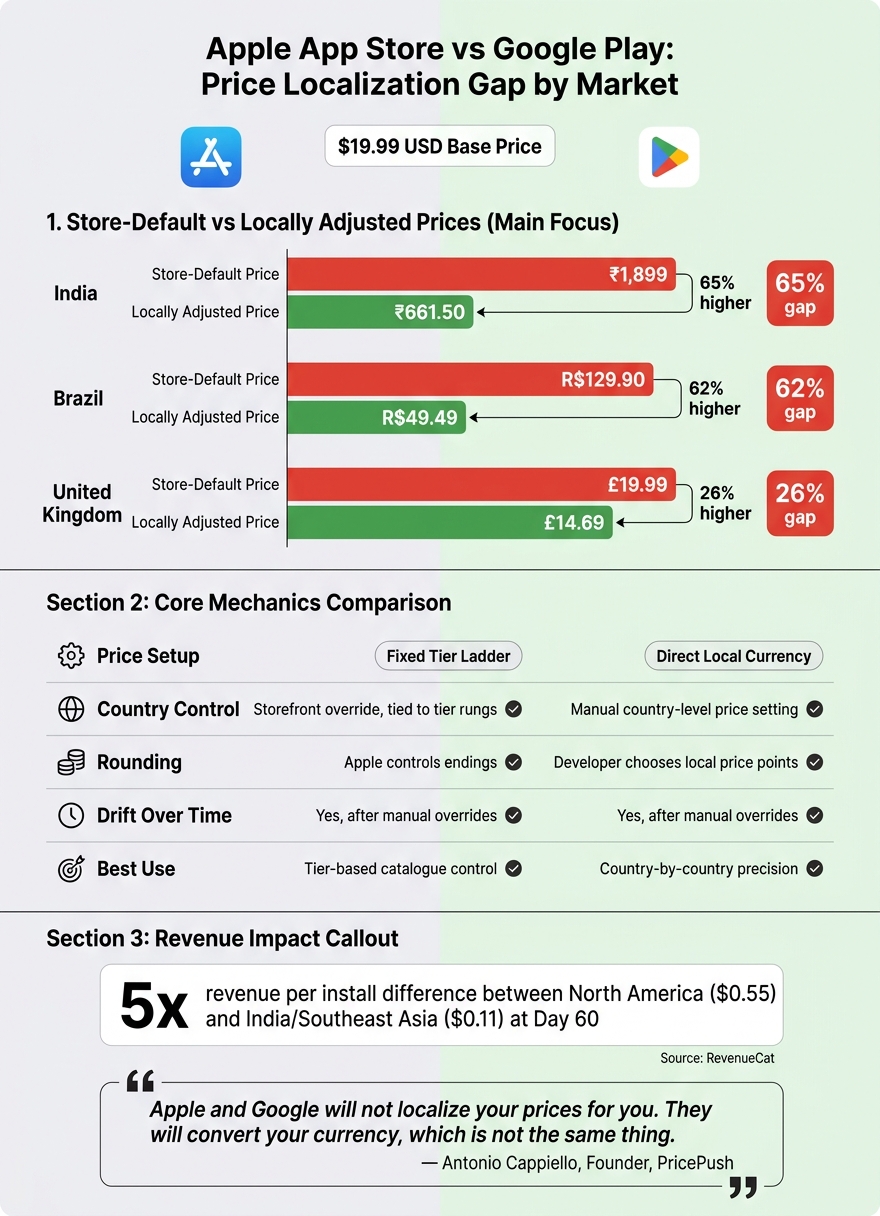
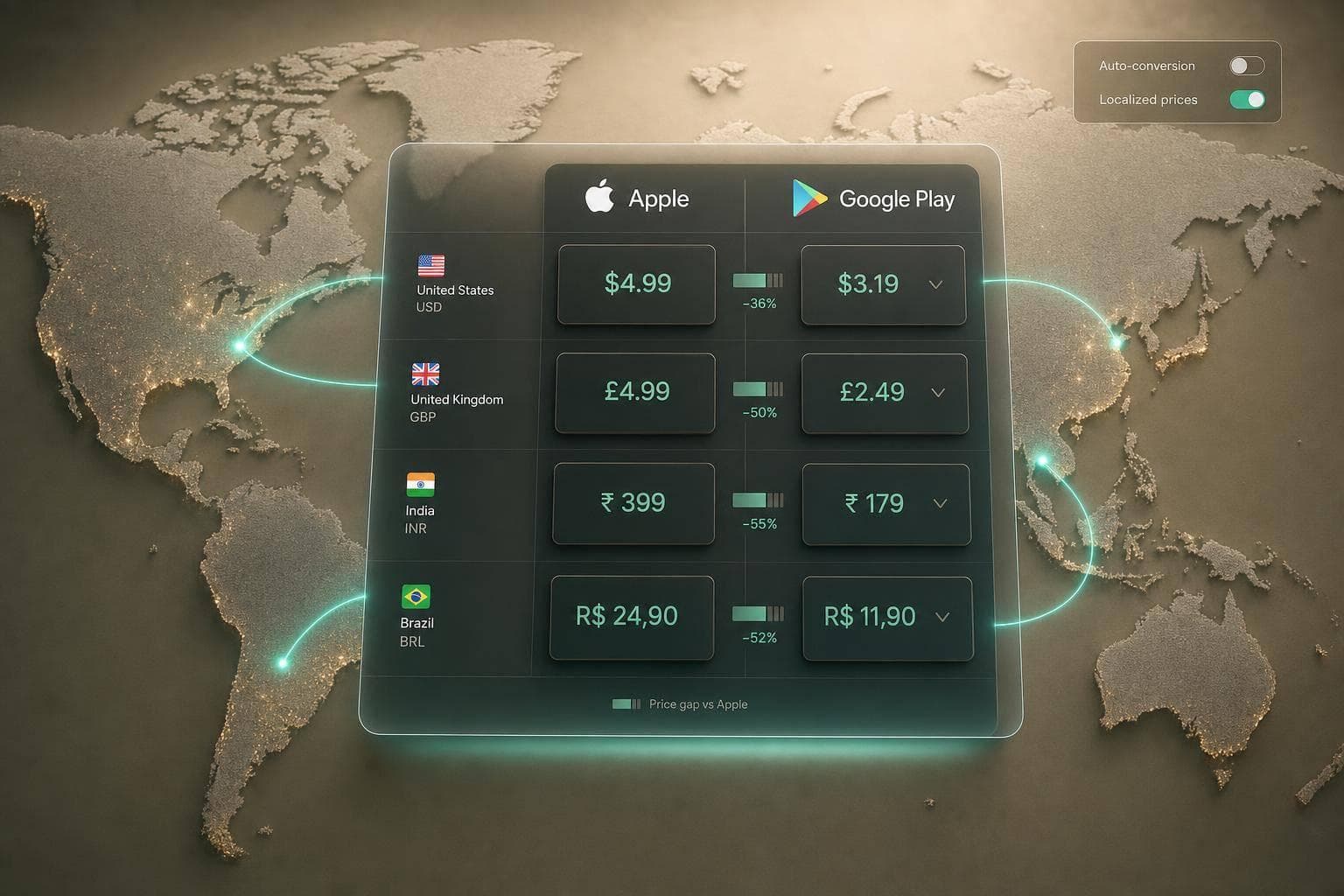
Apple App Store vs Google Play: Price Localization Gap by Market
Control, currency, rounding, and update workflow compared
The mismatch is built into how the two stores handle pricing. Apple maps prices to a fixed tier ladder, while Google Play lets you set direct local-currency prices. That means the same target price can land differently, even before taxes, FX movement, or promo logic come into play.
Here’s where that shows up most clearly:
| Feature | Apple App Store | Google Play Store |
|---|---|---|
| Rounding | Apple controls the ending | Google can follow your chosen local price or a suggested conversion |
| Bulk editing/API | App Store Connect API | Per-product pricing via Play Developer API |
| Price update speed | Up to 24 hours to propagate | Usually within hours |
| Subscription increases | May require user opt-in | Existing subscribers stay in legacy price cohorts unless migrated |
Rounding is a big part of the gap. Apple applies its own pricing patterns. In INR, prices often end in 9 or 99, while JPY prices tend to use round 100s. Google gives you more room to set the exact local number you want. So even if your pricing team is aiming at the same market position on both stores, the customer may still see different figures.
India, Brazil, and the UK: side-by-side price examples
You can see the gap clearly in live markets. Starting from a $19.99 U.S. base price, store-default pricing and a locally adjusted price can end up far apart:
| Market | Store-default price | Locally adjusted price | Gap |
|---|---|---|---|
| India | ₹1,899 | ₹661.50 | ~65% higher |
| Brazil | R$129.90 | R$49.49 | ~62% higher |
| United Kingdom | £19.99 | £14.69 | ~26% higher |
India is the clearest example. Apple’s FX-led conversion lands at ₹1,899, while a localised price is closer to ₹661.50. Brazil tells much the same story: R$129.90 versus R$49.49. The UK gap is smaller, but 26% is still enough to affect conversion, renewal, and paywall performance.
There’s another layer here too. In 27 territories, Apple and Google bill in different currencies for the same app. Once that happens, parity gets harder. A price that looks neat on one store may have no clean match on the other.
How price mismatches affect subscription and IAP revenue
This isn’t just a pricing-screen issue. It flows straight into subscription and IAP revenue. RevenueCat reports a 5x difference in revenue per install at Day 60 between North America ($0.55) and India/Southeast Asia ($0.11).
The stores convert your currency, but currency conversion is not price localisation - and the gap between the two is where overseas revenue quietly leaks out.
In practice, the fix is simple to describe and harder to keep up at scale: set deliberate local prices on both stores, use market-fit rounding, and review them on a steady cadence. That matters even more as FX rates move and your SKU count grows. Tools like RevenueCat, Adapty, and Purchasely help with billing and paywall delivery, but pricing still needs its own layer of analysis upstream. That’s where teams tend to need tighter review discipline across both platforms.
Subscriptions, IAPs, and keeping prices aligned across both stores
Once pricing drift appears in subscriptions and IAPs, the hard part isn’t spotting it. It’s keeping App Store and Google Play on the same target price over time.
How subscription and IAP setup differs by store
Apple and Google Play handle pricing in different ways, and that difference matters in day-to-day operations.
Apple uses a fixed price tier ladder for both subscriptions and IAPs. Google Play works with direct local-currency pricing. In practice, that means cross-store price matching is never a set-it-and-forget-it job. You’re working across two pricing systems with different mechanics.
Subscription price increases also behave differently. On the App Store, Apple may require existing subscribers to opt in before a higher price goes live. On Google Play, existing subscribers stay on the old price by default, so a price increase doesn’t roll through to current users on its own [4].
A repeatable workflow to keep cross-platform prices aligned
The answer is a repeatable pricing process, not a one-off currency conversion.
Start with an optimised U.S. anchor price. From there, use Purchasing Power Parity data from the OECD or World Bank to set affordability-adjusted targets in your main markets, rather than just translating USD into local currency [2].
Then map Apple tier prices against Google Play local prices in markets such as India, Brazil, and the UK. Apply market-level rounding before release. For example, use .99 endings in USD and 99 endings in INR where that fits local price expectations.
A simple operating rhythm helps:
- Review prices quarterly in stable markets
- Review them monthly in volatile markets
- Before each update, preview price diffs and check that billing flows won’t break
That last step is easy to skip, and it’s usually where teams get caught. A price update that looks fine in a spreadsheet can still create issues once it hits live billing systems.
Where Mirava, RevenueCat, Adapty, Purchasely, and Superwall fit
Once pricing is decided, billing and paywall platforms take over execution.
Mirava sits upstream as the pricing intelligence layer. It handles the pricing decision: what to charge, where, and how closely prices should stay aligned across stores. After that, RevenueCat, Adapty, Purchasely, and Superwall manage the downstream layer: billing, paywalls, and entitlements.
That division matters. Pricing analysis has to happen before a price reaches the paywall. Billing infrastructure can deliver a price cleanly, but it won’t decide whether that price makes sense for the market.
FAQs
Why do Apple and Google show different local prices?
Apple and Google show different local prices because they run on different pricing systems.
Apple uses a fixed price tier ladder that maps across storefronts. Google Play gives you more freedom to set local prices market by market.
Even when you use automatic pricing, neither system is based on PPP. Both lean on exchange rates, taxes, platform rounding rules, and their own regional price mapping. That’s why the same app or subscription can land at different price points in places like India, Brazil, or the UK.
If you want prices to match more closely across both stores, you usually need to override them manually and keep maintaining those local price points over time.
How do I match Apple tiers to Google Play prices?
Apple uses fixed price tiers. Google Play gives you more room to set local prices, so a one-to-one match often isn’t possible. The cleanest way to handle this is to start with your Apple App Store tier, then manually override each country’s Google Play price to get as close as you can.
That matters in practice. If you’re trying to keep price perception aligned across stores, Apple sets the anchor, while Google Play lets you fine-tune market by market. In other words, Apple gives you the frame; Google Play lets you adjust the picture.
There’s a trade-off, though. Manual overrides on either store switch off automatic price updates. Once you do that, you’re on the hook to review and adjust prices yourself when currencies move or tax rules change. If you skip that review cycle, price gaps can creep in fast, especially across emerging markets and higher-volatility currencies.
Tools like RevenueCat, Adapty, Purchasely, and Superwall can help with billing workflows, but they don’t replace the need to manage pricing logic carefully. That’s where a pricing layer upstream of paywalls and billing becomes useful: one place to analyse gaps, compare store outputs, and decide where manual intervention is worth it.
How often should I review local prices?
Review local prices on a regular basis. Store pricing can drift out of sync due to currency swings, tax changes, and updates to Apple’s price tiers. If you change prices by hand, you also switch off the store’s automatic conversions, which means set prices can go stale fast.
There’s no fixed review cycle. What matters is active monitoring, so you don’t leave money on the table. Mirava sets the pricing strategy upstream, while RevenueCat, Adapty, Purchasely, and Superwall handle billing and paywall execution.