Getting your app pricing right can boost revenue globally while making your app accessible to more users. Here's the challenge: a one-size-fits-all pricing model often excludes billions of potential customers due to differences in purchasing power worldwide. For example, a $9.99 subscription in the U.S. might be affordable, but in regions like India or Indonesia, it's considered expensive.
Key Takeaways:
- Localized pricing works: Apps with region-specific pricing see 250–350% more revenue internationally.
- Purchasing Power Parity (PPP) matters: Adjusting prices to match local affordability can increase revenue by 15–122% in just one month.
- Examples of success: Spotify grew its India revenue by 92.6% over four years by pricing its premium plan at $1.45/month instead of $10.99.
- Challenges: Avoid price arbitrage, monitor currency fluctuations, and align prices with local competitor rates.
- Actionable steps: Use A/B testing experiments, track conversion rates, and analyze metrics like Lifetime Value (LTV) and Customer Acquisition Cost (CAC) to refine pricing.
Localized pricing isn’t just about converting currencies - it’s about understanding local economies, user behavior, and market competition to maximize revenue while staying fair to users worldwide.
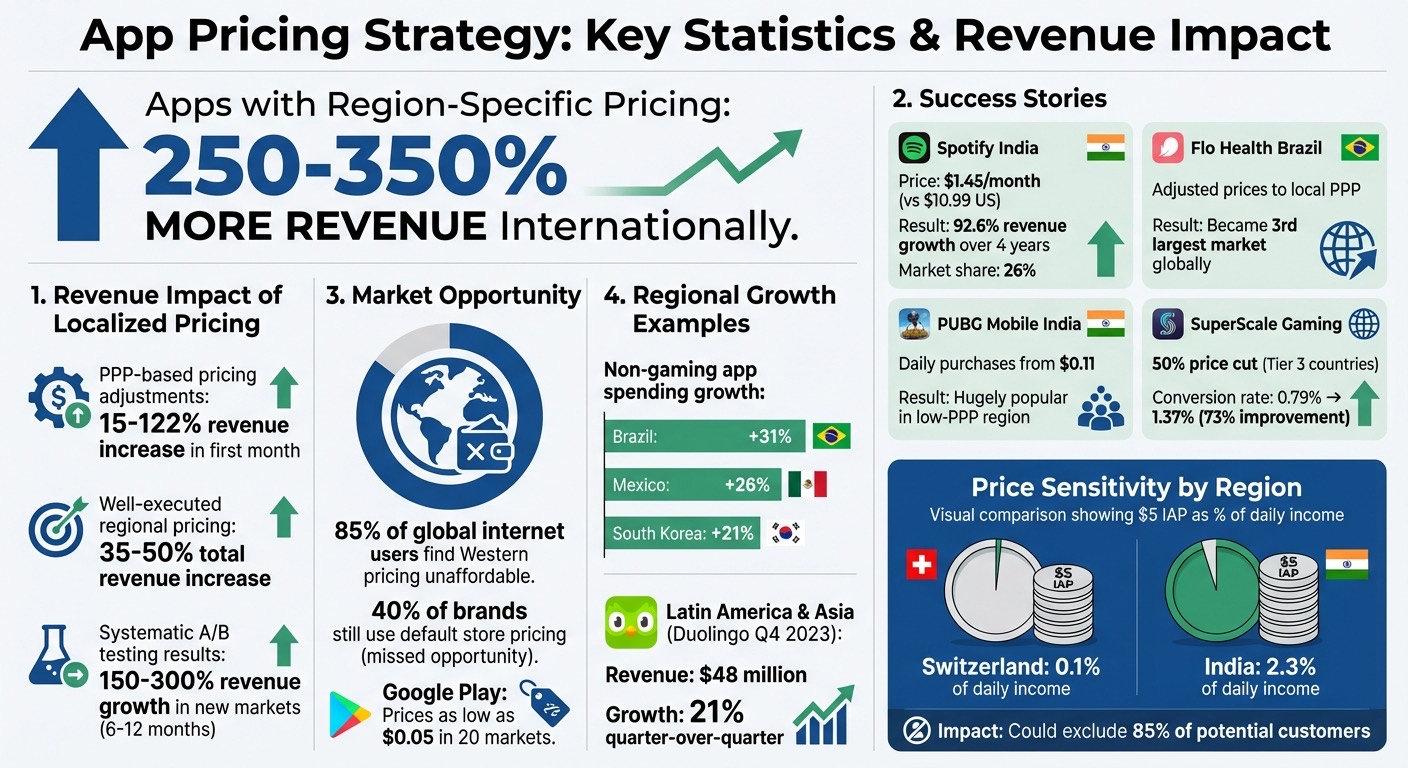
App Pricing Strategy: Key Statistics and Revenue Impact by Region
How to price your subscription app globally - Featuring Jacob Rushfinn
sbb-itb-43fe43a
How to Price Apps for Different Countries
Pricing your app for a global audience involves more than just converting your U.S. price into local currencies. While Apple and Google adjust for taxes and exchange rates, they don't factor in local demand or purchasing power. Relying solely on these default settings can mean missed revenue opportunities and even alienate potential users in certain markets. A smarter approach is to craft a strategy that considers local affordability, competitor pricing, and safeguards against regional price exploitation.
Let’s break down how to approach pricing using purchasing power parity (PPP), how to prevent price arbitrage, and why understanding competitor pricing is critical.
Setting Prices Based on Purchasing Power Parity (PPP)
PPP helps you determine what your app should cost in different countries to make it equally affordable everywhere. For example, a subscription in Mumbai should feel as accessible as one in Manhattan. While Apple suggests pricing subscriptions 21% lower in India and 26% higher in the U.K., many apps go further - pricing 50–80% lower in India and around 10% below U.S. rates in the U.K. [5].
To fine-tune your pricing, create a pricing index by analyzing about 10 competitors in each market. For instance, Duolingo charges more in Spain and France than in the U.S., as learning English holds higher perceived value for career growth in these regions [5].
In 2023, Flo Health adjusted its prices in Brazil to align with local purchasing power, leading to massive revenue growth - Brazil quickly became one of its top three markets globally [5][6]. Similarly, offering smaller, affordable packages can make a big difference in low-PPP regions. For example, PUBG: Mobile introduced daily in-app purchases starting at just $0.11 in India, which became hugely popular [9]. Google Play has also embraced this approach, allowing prices as low as $0.05 in 20 markets to cater to local spending habits [7].
"If your conversion rate in India is five times lower than in Canada, Australia, or US, well, there's some mismatch, right?"
– Jacob Rushfinn, Founder, Rushfinn Consulting [5]
Before applying PPP adjustments globally, ensure your base price is optimized through A/B testing. A poorly chosen benchmark can amplify pricing errors across all markets [5].
Preventing Price Arbitrage Across Markets
Large price differences between regions can lead to VPN-based arbitrage, where users exploit lower prices in certain countries. Platforms like Google and Apple are actively addressing this issue. In May 2025, Google expanded its automated systems to block purchases exploiting regional price gaps [11].
To minimize arbitrage, keep regional prices close to their converted USD equivalents - ideally at or above 95% of the converted value for high-value items [9]. Google Play now includes tools to verify users’ actual locations, and Apple periodically updates prices across its 174 storefronts to account for taxes and exchange rates, reducing opportunities for exploitation [10][11].
In countries with unstable currencies, such as Colombia or Turkey, frequent price updates are essential. Whether through automatic exchange rate adjustments or manual reviews, keeping prices aligned with economic conditions helps maintain fairness and profitability [9].
Analyzing Competitor Pricing in Each Market
Understanding competitor pricing requires more than surface-level research. Using a VPN to access local app stores lets you see what competitors are charging in real time. Third-party tools often lag behind, especially after platform updates or shifts in currency values [5].
Track at least 10 key competitors in your top markets, including both global players and local apps. While global apps set general expectations, local competitors often have a better grasp of what users are willing to pay. For example, in competitive markets like India and Brazil, Android’s flexible pricing options allow you to strategically undercut rivals. Garena’s Free Fire gained significant market share by pricing in-app purchases more than 50% lower than similar offerings from competitors [9].
It’s also important to consider regional factors influencing competitor pricing. In Poland, for instance, a 23% VAT can push in-app purchase prices to 130–150% of U.S. prices, even though the country’s income per capita is only 24% of the U.S. Many developers in such high-tax regions absorb part of the tax cost to stay competitive [9].
When testing your prices, don’t be afraid to experiment with bold changes. Testing large differences, like $39 versus $69, often provides clearer insights into how price-sensitive your audience is. These findings can guide further refinements to your pricing strategy [5].
Metrics to Track When Testing Prices
To move from guesswork to informed decisions, tracking the right metrics is essential when testing pricing strategies. Breaking down performance by region plays a critical role - a price adjustment that works well in one market might negatively impact another. Key areas to monitor include conversion rates and churn, regional revenue trends, and the balance between lifetime value (LTV) and customer acquisition cost (CAC). Below, we’ll explore the specific metrics that reveal the effects of pricing changes across different regions.
Measuring Conversion Rates and Churn
Trial-to-paid conversion rates provide a clear picture of how users respond to pricing. A decline in conversions might indicate "sticker shock", while steady or improved rates suggest the price is hitting the sweet spot. To ensure that higher prices aren’t causing users to leave prematurely, keep an eye on churn rates at 7-, 30-, and 90-day intervals [17][3].
The goal is to maximize revenue per user by finding the right balance between price and conversion. Take Netflix India as an example: its mobile-only plan, priced at about $2.70 per month, accounted for nearly half of all new subscriber additions in its first quarter after launch [3].
Segmenting data by country and operating system helps uncover regional differences. For instance, iOS users in one region might be more willing to pay higher prices than Android users in another. To ensure accurate results, run pricing tests for 2–4 weeks with at least 1,000 users per variant. Pay special attention to the first 24–48 hours after implementing a price change, as this is when key trends often emerge [3][13].
"Never assume that you know how the market will react to certain pricing. Try things, gauge the reaction, and adjust accordingly."
– Zachary Shakked, Founder of Hashtag Expert [15]
Now, let’s dive into how revenue trends differ by region.
Tracking Monthly Recurring Revenue (MRR) by Country
Looking at global averages alone can obscure important regional differences. For example, while North America might generate $11.20 per user, other markets could average closer to $1.09. Breaking down MRR by country helps pinpoint which regions are thriving and which might need pricing adjustments [1].
In Q4 2023, Duolingo reported $48 million in revenue from Latin America and Asia, reflecting a 21% quarter-over-quarter growth. This was driven by a pricing approach tailored to local economic conditions and perceptions of fairness [1]. Similarly, Spotify’s localized pricing in India - ₹119 per month compared to $10.99 in the U.S. - resulted in 92.6% revenue growth in that market, helping the company secure a 26% market share over four years [1].
It’s important to track both new MRR and churn rates together. A lower price might increase conversions, but if it also leads to higher churn, the overall revenue impact could be unsustainable. Markets with high downloads but low MRR often signal opportunities for more targeted pricing strategies [1].
Calculating LTV and CAC Ratios
LTV and CAC are critical for determining whether your pricing strategy is sustainable in the long run. Cohort analysis over 90-day periods can reveal how regional price changes affect these metrics [13]. For example, if your CAC is $15 and your LTV is $45, your pricing is on solid ground. However, if a price increase drives up CAC without a corresponding boost in LTV, your margins could take a hit. Our app revenue estimator is a fast way to run those numbers before you commit to a change.
Before testing, establish baselines for metrics like Average Revenue Per User (ARPU), LTV, and conversion rates. Secondary metrics such as Average Revenue Per Paying User (ARPPU), time to conversion, and feature adoption within specific pricing tiers can provide additional insights [13][14].
A 2025 case study from SuperScale Gaming illustrates this well. A 50% price cut in Tier 3 countries boosted conversion rates from 0.79% to 1.37%, a 73% improvement. This lower price helped recover CAC more quickly and drove higher overall revenue. In fact, well-executed regional pricing strategies can lead to total revenue increases of 35–50% [1].
"When your app costs 2–5% of someone's monthly income, they simply won't convert... But price it at 0.5–1% of local income? Suddenly, users stop calculating 'is this worth it?' and start thinking 'can I afford this?'"
– Zoë Castillo, Mirava [1]
In-App Purchases vs. Subscriptions: Which to Choose
Deciding between in-app purchases (IAPs) and subscriptions comes down to understanding what your users value most. Subscriptions provide a steady, predictable revenue stream (MRR) and can significantly increase lifetime value (LTV). They work particularly well for apps offering ongoing benefits, like cloud storage, content libraries, or productivity tools [19]. On the other hand, IAPs are ideal for one-time unlocks or consumable items. They lower the barrier to entry, making them effective for quick conversions, especially in price-sensitive markets [1].
Some apps successfully combine both models. Whether the freemium half or the paid half carries the revenue depends on the market, and how freemium and paid apps earn by region has the numbers. For instance, you could offer a basic subscription with optional one-time purchases for premium features. Alternatively, you might provide a lifetime purchase option alongside monthly or annual plans [18][19][5]. The secret lies in aligning your monetization strategy with what your users value - whether that's exclusive access, added storage, or specific content [19].
Regional factors also play a big role. In areas with lower purchasing power, affordable one-time purchases or short-term subscriptions (like weekly plans) often outperform pricier annual tiers [5]. For example, European users tend to favor weekly subscriptions, while in India, app prices are typically 50–80% lower than in the U.S. to reflect local economic conditions - far beyond the 21% price reduction Apple suggests [5][8].
Now, let’s dive into how to price one-time purchases and subscriptions effectively.
How to Price One-Time Purchases
For one-time IAPs, clarity of value is essential. Pricing should reflect local income levels to maximize conversions. In Tier 1 markets like the U.S., UK, and Germany, you can even raise prices by 10–20%. In Tier 3 markets like India, Southeast Asia, and Africa, cutting prices by 50–70% often results in higher conversion rates [1].
Psychological pricing is another powerful tool. Using local price endings - like ₹99 instead of ₹100 - can boost conversions by 15–20% [1]. With Apple offering 900 price points ranging from $0.29 to $10,000, there’s plenty of room to experiment and find what works best [21]. The goal is to strike a balance: set an entry price low enough to encourage purchases while capturing additional revenue from premium features.
Volume is key in emerging markets. For example, SuperScale Gaming reduced prices by 50% in Tier 3 regions in 2025. This move increased their conversion rate from 0.79% to 1.37% - a 73% improvement that more than offset the lower price point [1].
Building Subscription Plans That Drive Conversions
Subscriptions should cater to the diverse needs of your audience. Tailor your tiers to reflect how different users perceive the value of your app. Offering discounted annual plans can help reduce churn in price-sensitive regions [1]. Family plans also need adjustments: instead of the usual 6x price multiplier for premium markets, pricing them at 2.5–3x the individual rate works better in emerging markets [1].
Weekly subscriptions are becoming popular, especially in regions where users are hesitant to commit to monthly plans. European users, in particular, show a strong preference for weekly options [8].
Introductory offers can also help convert hesitant users. Apple allows developers to experiment with “Pay as you go,” “Pay up front,” or “Free” trial periods [20]. However, it’s crucial to monitor long-term LTV. A low introductory price that leads to high churn won’t benefit your bottom line [5][8].
"If your business is laser-focused on maximizing paid conversion and near-term revenue, a free trial is the way to go."
– OpenView [18]
Adjusting Subscriptions and IAPs for Different Regions
Regional pricing adjustments can unlock significant revenue opportunities. For example, the period tracking app Flo experimented with lower prices in Brazil in 2024. Despite the price cuts, Brazil became their third-largest market, remaining highly profitable due to lower ad acquisition costs [5].
Perceived value matters just as much as price. Apps like Duolingo charge more in countries like Spain and France than in the U.S., as learning English for professional growth is seen as more valuable in those regions [5].
Smart regional pricing can increase total app revenue by 35–50% [1]. Markets with high download numbers but low conversions often point to pricing mismatches rather than a lack of interest. Non-gaming app spending is also growing rapidly in secondary markets - for example, Brazil saw a 31% increase, Mexico 26%, and South Korea 21% [5]. Proper pricing adjustments can turn these markets into major revenue drivers.
| Model | Best For | Regional Advantage |
|---|---|---|
| Subscriptions | Ongoing value delivery | Maximizes ARPU through tailored pricing [1] |
| In-App Purchases | One-time unlocks or consumables | Drives volume in price-sensitive markets [1] |
| Hybrid | Diverse user needs | Captures both immediate sales and long-term growth [18][19] |
Tools and Methods for Setting Competitive Prices
When it comes to pricing across different markets, precision is key. Automated tools can save you from the hassle of manual updates, making regional adjustments smooth and efficient.
Automating Regional Pricing with Mirava
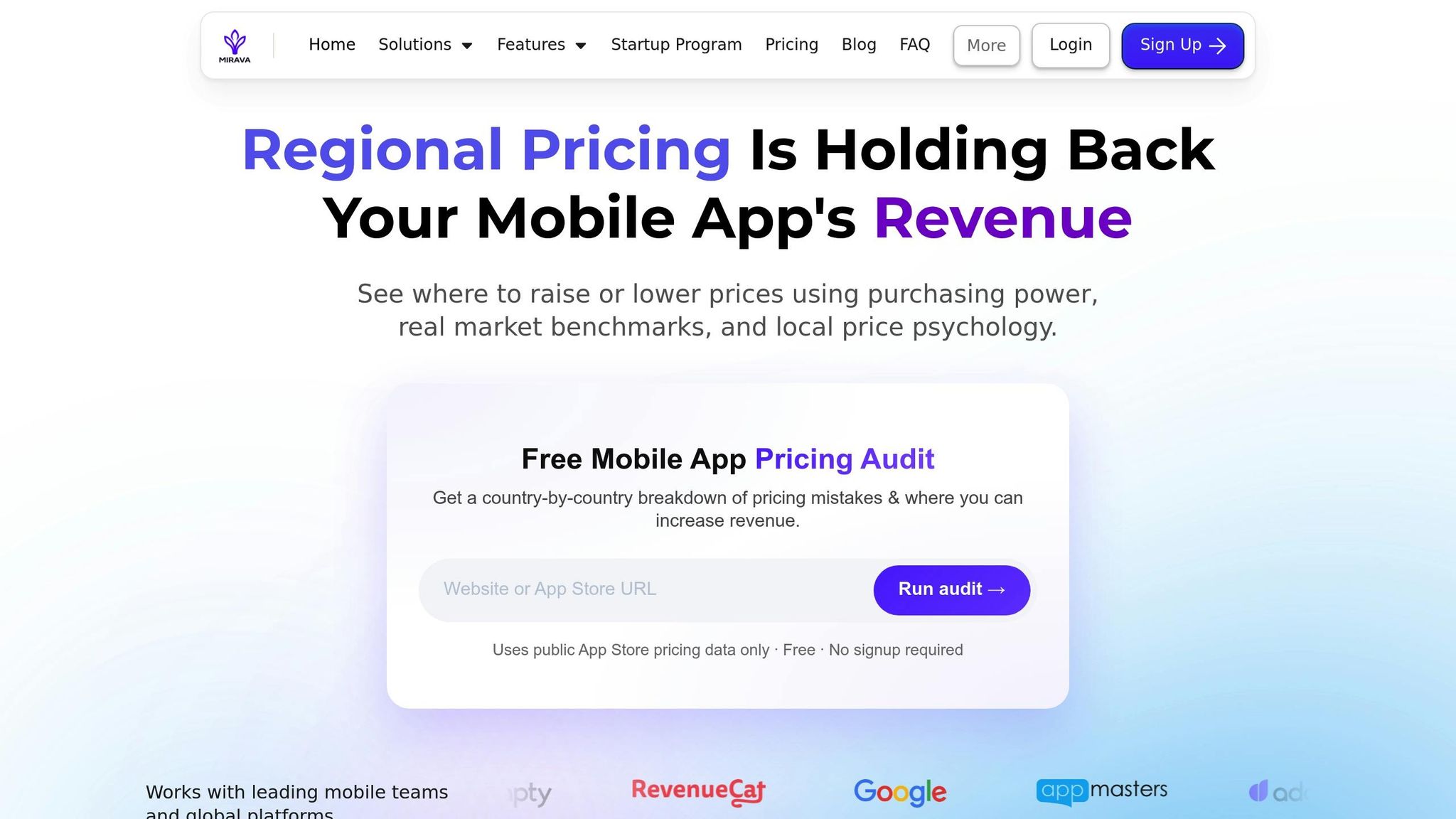
Mirava simplifies regional pricing by using algorithms based on Purchasing Power Parity (PPP) and Willingness to Pay (WTP). These tools let you preview the potential revenue impact before rolling out changes. Instead of painstakingly adjusting prices for each country, you can set PPP-based rules once and let Mirava handle the heavy lifting. Apps that move from a single global price to localized, data-driven pricing often see meaningful revenue gains.
Mirava’s platform also allows you to sync pricing rules across iOS and Android instantly from a single dashboard. You can define adaptive pricing rules, adjust for foreign exchange rates, or apply custom multipliers - all in one place. Plus, its collaboration features, like drafts and approval workflows, ensure that teams stay on the same page.
Running Pricing Tests by Region
Testing pricing strategies by region requires careful planning. You’ll need to isolate each market to avoid skewing results and account for unique spending habits [3][13]. Start with a clear hypothesis, such as: "Adjusting [specific pricing element] will lead to [expected result] because of [reason]."
"A good hypothesis isn't 'let's see what happens if we lower prices.' That's not a hypothesis; that's just wishful thinking with extra steps."
– Zoë Castillo, Mirava [13]
There are several tools to help you test effectively:
- Google Play Console supports A/B testing for up to 1,000 in-app products with two variants plus a control. However, experiments are capped at six months [23].
- RevenueCat is ideal for subscription apps, allowing you to test paywalls and billing cycles [3][13].
- Firebase offers a budget-friendly way for Android developers to test pricing variants in real-time [3][13].
For accurate results, focus on one variable at a time. Run tests for at least 2–4 weeks to capture weekly patterns and aim for a sample size of at least 1,000 users per variant with a 95% confidence interval [3][13]. Once you identify the best-performing option, roll it out gradually - starting with 10% of users, then scaling up to 50%, and finally 100% - while keeping a small control group for comparison [3][13]. Businesses that use systematic A/B testing for regional pricing have reported revenue growth of 150-300% in new markets within 6 to 12 months [3].
Using Surveys to Validate Pricing
Surveys and user feedback are essential for confirming whether your pricing aligns with customer expectations. Keep an eye on app store reviews and support tickets in new markets - they can quickly reveal if users find your prices too high or if there’s confusion about payment methods [2]. Surveys also highlight how a single price point can have vastly different effects across regions.
Validation goes beyond just numbers. It’s important to ensure that currency displays, regional payment methods (like UPI in India or Alipay in China), and even how prices are presented fit local norms [3][2]. Start with PPP data from sources like the World Bank or OECD, and then test three price variants in each region: the PPP baseline, 20% higher (premium), and 20% lower (volume) [3]. To avoid brand devaluation or price arbitrage complaints from premium markets, cap regional discounts at 60% [2].
Companies that have adopted PPP-based pricing strategies have seen revenue increases ranging from 15% to 122% within the first month [2]. These surveys and feedback loops ensure that your pricing strategies are not only data-driven but also resonate with regional expectations.
Common Mistakes in Global App Pricing
Even seasoned developers can hit roadblocks when expanding their apps into global markets. Success often hinges on avoiding key errors that could derail revenue or alienate users. While automated pricing tools can simplify adjustments, ignoring the nuances of local markets is a frequent and costly mistake.
Overlooking Local Market Conditions
Using a one-size-fits-all pricing model ignores the economic realities of different regions. For instance, a $5 in-app purchase might seem negligible in Switzerland, where it represents just 0.1% of daily income, but in India, it accounts for 2.3% - a difference that could exclude up to 85% of potential customers worldwide [2]. Beyond income levels, payment preferences also vary. In India, users favor UPI, while in China, Alipay is a dominant choice. Failing to offer these options can lead to high checkout abandonment, even if prices are adjusted appropriately [2][3]. Companies that adapt prices based on purchasing power parity (PPP) often see significant subscriber growth in emerging markets. The key takeaway? Understand not just what people can afford, but also how they prefer to pay.
Failing to Account for Currency Fluctuations
Currency fluctuations can wreak havoc on app pricing. Platforms like Google Play and the App Store update exchange rates infrequently, which means prices can end up 20–30% higher than intended during periods of economic instability [24]. This discrepancy not only reduces conversions but also opens the door to price arbitrage, where users exploit VPNs to purchase from cheaper regions. On Google Play, there’s an additional risk: adjusting the base price can inadvertently reset manually configured regional prices [24]. To avoid these pitfalls, monitor exchange rates and pricing in key international markets weekly. Before rolling out global pricing updates, audit all active, paused, and archived products to ensure consistency [24].
Launching Globally Without Testing First
Rolling out global pricing without testing is a risky move. What works in one market might flop in another due to differences in local conditions. For example, a productivity app reduced its pricing in India from ₹749 to ₹199, leading to an 800% increase in downloads in that region. This surge also boosted its U.S. category ranking by 15%, thanks to the momentum gained globally [4]. To replicate such success, test pricing variations in each region for 2–4 weeks before a full rollout. Start with a phased approach, scaling from 10% to 100% while maintaining a small control group [3]. Apps that use structured regional pricing strategies often see revenue growth of 150–300% in new markets within 6–12 months. Thorough regional testing not only minimizes risks but also ensures a data-driven approach to pricing adjustments.
Conclusion
App pricing is a constantly shifting growth lever that requires ongoing refinement. Surprisingly, about 40% of brands still stick with default store pricing[5], leaving a lot of potential revenue untapped. Pricing touches every key growth metric at once - conversion rates, user retention, lifetime value, and revenue predictability - all hinge on getting it right[16].
One powerful strategy is regional pricing optimization. By tailoring prices to align with local purchasing power, you can reach the 85% of global internet users who find standard Western pricing out of reach[2]. Real-world examples highlight how thoughtful localization can drive revenue across diverse markets.
To ensure your localized pricing strategy works, combine market data with direct user feedback. Start by evaluating price elasticity in your primary market before scaling globally[5]. Run A/B tests with different price points over 2–4 weeks, ensuring each variant has at least 1,000 users for meaningful results[3][5].
Pricing isn’t just about tweaking numbers - it’s a critical tool for global growth. Success lies in balancing market needs, perceived value, and user behavior[12]. Beyond adjusting prices, true optimization involves localizing payment methods, staying on top of currency fluctuations, and anchoring your pricing strategy to the real value your app delivers. As Daphne Tideman puts it:
"Every global app should take the time to consider if it's worth improving price localization... This is such a major opportunity for you to maximize your revenue and get more out of your app without having to build a single additional feature"[5].
FAQs
How can I use Purchasing Power Parity (PPP) to set fair app prices for different regions?
Purchasing Power Parity (PPP) is a smart approach to setting app prices that resonate with users in different regions. Instead of sticking to flat rates or simply converting prices based on exchange rates, PPP adjusts pricing to match the economic realities of each market. This makes apps more affordable for users while still allowing businesses to maximize revenue.
Here’s how to use PPP for pricing:
- Start with a base price in USD.
- Use trusted PPP data to adjust prices based on local purchasing power.
- Test and refine your pricing through methods like A/B testing to find what works best.
By tailoring prices to reflect local economic conditions, you can make your app more accessible, improve user satisfaction, and tap into global revenue opportunities.
How can I prevent users from taking advantage of price differences across regions?
To address price arbitrage effectively, consider localized pricing that aligns with purchasing power parity (PPP). This method adjusts prices based on local economic conditions and income levels rather than solely depending on exchange rates. By tailoring prices to reflect the realities of each market, you can curb the motivation for users to take advantage of regional price differences.
On top of that, A/B testing is a valuable tool for discovering the best pricing strategies for specific regions. It ensures your decisions are backed by data and not guesswork. To make the process more efficient, you can use automated tools designed for regional pricing. These tools help maintain consistent pricing across different markets, ensuring fairness for customers while safeguarding your global revenue.
How can I decide between using in-app purchases or a subscription model for my app?
Deciding between in-app purchases and subscriptions comes down to how your app provides value and your goals for user engagement over time.
- In-app purchases are a great fit for one-time or consumable items. Think virtual goods, unlocking extra features, or accessing premium content. These are purchases users make as needed, without ongoing commitments.
- Subscriptions shine when your app offers ongoing value. This could include regularly updated content, continuous access to a service, or premium features that users benefit from over a longer period.
When deciding, take a close look at your target audience, the type of value your app delivers, and even regional preferences. Testing both models in different markets can reveal what resonates best with your users and help fine-tune your pricing strategy for better revenue results.